FolderFort Review: I Bought the Lifetime Plan and Checked What Changed in 2026
Some links in this article are referral links. They do not influence my review: I bought FolderFort myself, I use the storage, and the referral link may give you 25% off if you sign up.
Quick Verdict: Is FolderFort Worth It?
FolderFort is worth considering if you want cheap lifetime cloud storage and you understand that this is not a polished Google Drive, Dropbox or pCloud replacement.
The biggest reason to buy it is simple: storage is cheap, especially if you catch a lifetime deal. The interface is clean enough, uploads can be fast on a good connection, and workspaces/sharing are useful in theory.
The biggest reasons to be careful are also simple: FolderFort is still a young service, some parts of the interface are clunky, bulk file management needs work, sharing is not always intuitive, and the product has changed a lot since I first tested it.
I would use FolderFort as secondary storage for files I want to keep somewhere cheap. I would not use it as my only backup, and I would not upload highly sensitive files without encrypting them myself first.
25/06 update
Folder Fort said future development is moving toward Folder Fort Business, new lifetime accounts are being phased out, and extra lifetime storage can no longer be added to existing lifetime accounts. They later clarified that existing lifetime accounts continue as-is and migration is optional, which I cover in the 25/06 lifetime-account update below.
I recently found myself in need of a Google Drive alternative. Their storage options jump from 200GB to 2TB with nothing in between, which didn’t suit my needs. I was looking for a substantial amount of storage at a lower cost.
During my search, I came across FolderFort, a new cloud storage service that appeared in my phone’s news feed. They were offering 1TB of lifetime storage for $69.99 on StackSocial. Given that the product was relatively unknown and their website appeared to be new, I suspected this might be part of a marketing strategy to attract initial customers through online publicity. Despite some reservations, I decided to purchase the service and test it out. If this whole thing disappeared in a few months, I wouldn’t really lose much, so that was my reasoning for trying it out.
A lot of cloud storage reviews become outdated quickly because FolderFort has been changing since launch. This review is based on the version I actually bought and used, plus a fresh check of what FolderFort currently lists on its own website in 2026.
The important question is not just “does FolderFort have features?” It now has more features than when I first bought it. The real question is whether those features are polished enough to trust as your main cloud storage.
Table of Contents
What Is FolderFort?
FolderFort is a cloud storage service that originally caught my attention because of cheap lifetime storage deals. When I first bought it, it felt like a basic browser-based storage tool. Since then, it has added more serious features, including Android and iOS apps, FF Connect, WebDAV, SFTP and rclone documentation.
That makes it more useful than when I first tested it, but I still see it as a young cloud storage service with rough edges rather than a polished Google Drive or Dropbox replacement.
What Changed in 2026?
One reason I think my review is worth keeping updated is that FolderFort has changed quite a bit since I first bought it.
When I first tested FolderFort, it felt like a very basic browser-based storage product. That is not fully accurate anymore. FolderFort now has an official Android/iOS apps page, and its own documentation now talks about FF Connect, SFTP, WebDAV and rclone access.
That sounds like a big upgrade, and in some ways it is. But I would still separate “feature exists” from “feature is polished.” The Android app exists and I have used it, but it still does not feel as smooth as Google Drive or Dropbox. The iOS app exists too, but I have not personally tested it.
The more technical FF Connect features are also interesting. FolderFort now lists WebDAV access as live across its server regions and gives setup instructions for SFTP, WebDAV and rclone. However, the documentation also says to set parallel transfers/connections to 1-2, lists a max of 2 concurrent sessions per user, and warns about rate limits if you do too much browsing, checking or listing activity.
So the honest update is this: FolderFort has clearly moved beyond the simple web-only product I first bought, but I would still treat these newer features as developing features rather than fully mature Dropbox-level sync.
Who FolderFort Is Actually For
FolderFort makes the most sense for people who want cheap storage and do not need a polished sync app, deep collaboration tools, or a full Google Drive replacement.
I would treat it as a secondary storage option: good for files you want to keep somewhere cheap, but not the only place where you store important data.
FolderFort is probably a decent fit if you want:
- Cheap long-term cloud storage
- Simple file uploads
- Storage for videos, documents, archives, courses, backups or media files
- A secondary cloud storage account
- Lifetime storage pricing instead of another monthly subscription
FolderFort is probably not the best fit if you need:
- A mature Dropbox-style sync workflow
- Google Drive-style collaboration and document editing
- A privacy-first or zero-knowledge cloud storage provider
- A polished mobile-first experience
- A storage provider you fully trust as your only backup
Current FolderFort Pricing
FolderFort’s pricing has changed since I first bought my 1TB lifetime deal for $69.99, so check the live price before buying.
As of my latest check, FolderFort lists these regular monthly plans on its pricing page:
| Plan | Storage | Price |
|---|---|---|
| Free | 1GB | $0/month |
| Pro 150GB | 150GB | $1.49/month |
| Pro 250GB | 250GB | $2.99/month |
| Pro 500GB | 500GB | $4.99/month |
| Pro 1TB | 1TB | $8.99/month |
| Pro 2TB | 2TB | $16.99/month |
| Enterprise | 10TB | $49.99/month |
FolderFort also lists an annual billing option with a 16% saving.
The lifetime deal is still the main reason FolderFort is interesting. FolderFort’s current lifetime storage product page lists 1TB and 3TB lifetime options, with a price range of $79.99 to $149.00 at the time I checked. A separate lifetime special page showed different coupon-based pricing: $129 for 1TB with coupon SAVE270, and $299 for 3TB with coupon SAVE700.
That is why I would not treat any single FolderFort price as permanent. The real buying advice is simple: check the final checkout price, check which server you are selecting, and make sure you understand whether you are buying a monthly subscription, annual subscription, or actual lifetime storage.
The API Credits Catch
One thing buyers should understand before paying for FolderFort is API credits.
FolderFort says API credits are used when you upload or download files through third-party tools and the Folder Fort Sync App. Their own explanation says 1GB equals 1 credit, and credits are deducted only when a file is successfully transferred.
This matters because “cloud storage” and “sync” are not always the same thing here. You may have storage space in your account, but using sync tools or third-party transfer tools can involve API credits.
FolderFort’s app update page says users no longer need Pro for auto sync, which is good. But I would still read the API credit page carefully before relying on FolderFort as a heavy sync solution. For basic manual storage, this may not matter much. For automatic syncing, rclone, WebDAV, SFTP or large repeated transfers, it matters a lot.
Security and Privacy: What I Could Verify
FolderFort says in its encryption documentation that it uses Backblaze infrastructure, SSL encryption for uploads/access, AES-256 server-side encryption for files at rest, and optional 2FA.
That sounds fine for basic cloud storage, but it is not the same thing as client-side encryption or zero-knowledge storage. In plain English: I would not treat FolderFort as a privacy-first vault for highly sensitive files unless I encrypted those files myself before uploading them.
FolderFort’s privacy policy also says that Backblaze B2 is used for cloud storage and that Backblaze’s privacy policy applies to stored files. That is not automatically bad, but it means FolderFort is not fully independent on the infrastructure/privacy side.
Feature Checklist
| Feature | FolderFort status | My take |
|---|---|---|
| Web upload | Yes | Works, but bulk uploads were messy in my test |
| Workspaces | Yes | Useful idea, but moving files between workspaces was not smooth |
| File/folder sharing | Yes | Works, but sharing was more confusing than expected |
| Android app | Yes | Exists now, but still not as polished as Google Drive/Dropbox in my experience |
| iOS app | Yes | Officially listed, but I have not personally tested it |
| Sync/auto upload | Exists / evolving | Feature exists, but read the API credit rules before relying on it |
| FF Connect | Yes | FolderFort documents SFTP, WebDAV and rclone access |
| WebDAV/rclone | Yes | Useful for power users, but documentation recommends low concurrency |
| 2FA | Listed by FolderFort | Good to have, but I did not do a security audit |
| Server-side AES-256 encryption | Listed by FolderFort | Basic cloud-storage security claim, not zero-knowledge encryption |
| Client-side encryption | Not confirmed | Do not treat it as a privacy-first vault |
| File versioning/recovery | Listed on the Google Play app page | Mentioning it as a listed feature only, because I have not personally tested it |
| Customer support | Exists | I’m only counting my actual support/community experience, not inventing support tests |
Registration Process
The registration process was straightforward:
- Buy it on StackSocial
- Get a redeemable code
- Register on FolderFort’s website
- Use the code
One confusing aspect was having to choose a server, either EU or USA. Initially, I picked the EU server, but it wouldn’t let me register. After trying again with the same issue, I chose the American server, and it worked.
FolderFort Login Process
Logging in also prompts you to pick a server, which can be confusing. As of writing this review, two more servers have been added during the login process, making it even less intuitive and more confusing.
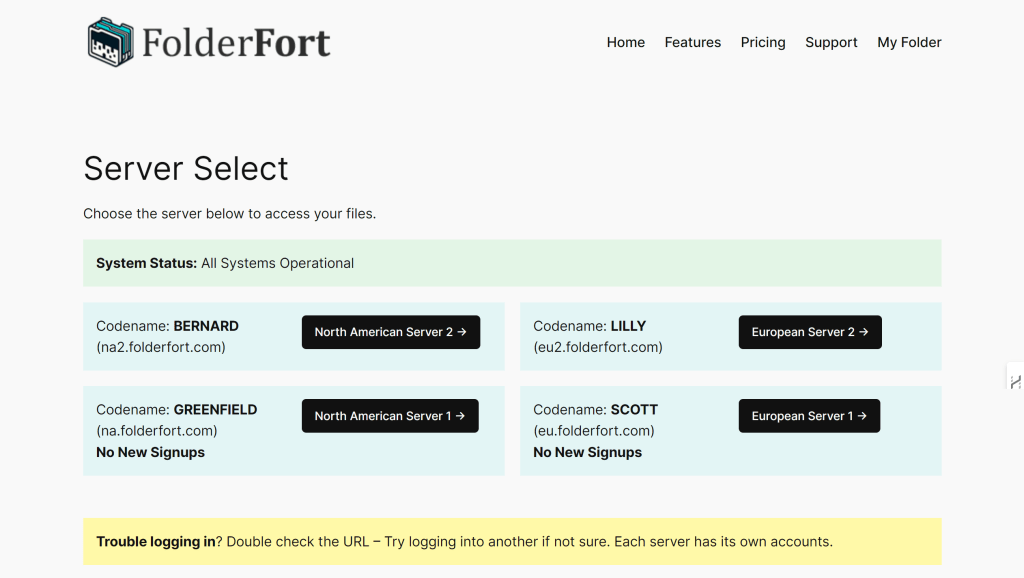
I’ve tried logging in to the “North American Server 2” but it said my password doesn’t work. I figured that this is just another thing they didn’t work through, so I went back and tried logging in to “North American Server 1” and lo and behold, I automatically logged in. Guys, you really have to work on this.
Uploading Experience
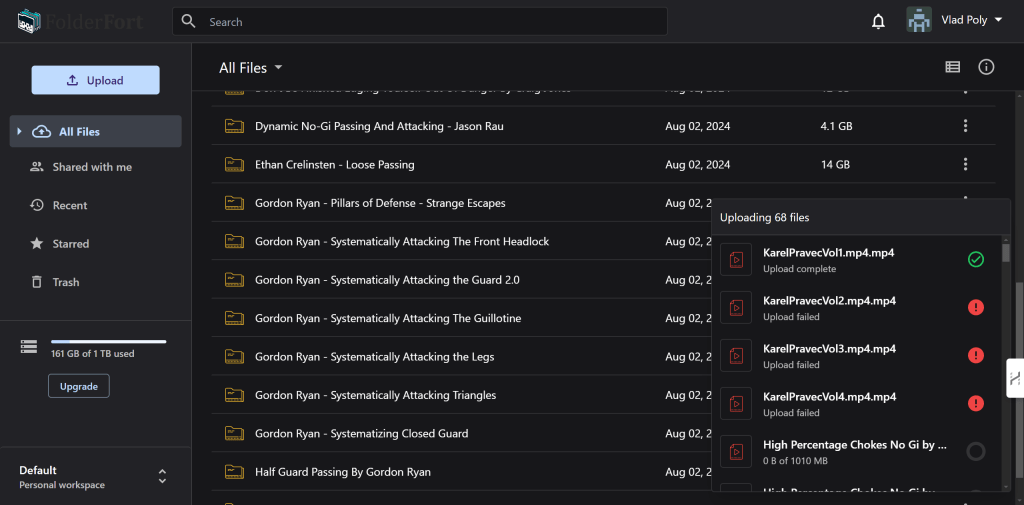
I tried uploading 50 folders of my BJJ instructional videos, which revealed some issues:
- Some files failed to upload without explanation
- When I clicked on the settings tab, the “uploading files” window disappeared, though the uploads continues, this left me confused about which files had been successfully uploaded
I reached out to their support team, and they advised me to upload fewer files at once. I started uploading 10 folders at a time, and it kind of worked, but I still had to reupload a few files because they wouldn’t upload for some reason (again, no explanation). This is something they need to improve.
While uploading from my office, I reached crazy upload speeds and could upload 1GB files in less than a minute. At home, with a weaker network, it took longer.
Features and Limitations
A nice feature of FolderFort is the ability to create workspaces inside your storage. You can invite users and share these workspaces with them, and these users get an additional 1GB for free (I guess to upload to my space?).
However, there are still some significant limitations:
- The mobile app exists now, but it still feels early and not fully polished
- Newer app and FF Connect features exist, but they still do not feel as mature as bigger cloud storage tools
- Can’t select multiple folders at once for deletion
- Not possible to pause and resume your uploads
If you’ve uploaded 50 folders (like I did) and you’d like to remove them all - no chance. You have to go and delete them one by one, then they’ll be placed in the trash folder (and still take up space), and you have to go there and delete them one by one, AGAIN. Super frustrating.
Sharing Files
After uploading 45 folders over the course of a few days (splitting them into 5-10 folders per upload), I decided to share my whole library with a friend so we could discuss some of the uploaded material. Unfortunately, it’s not as straightforward as it seems. There are two ways to go about this:
- Create a separate Workspace, share it with your friend, and add your files to that space
- Share the folder(s) directly with your friend
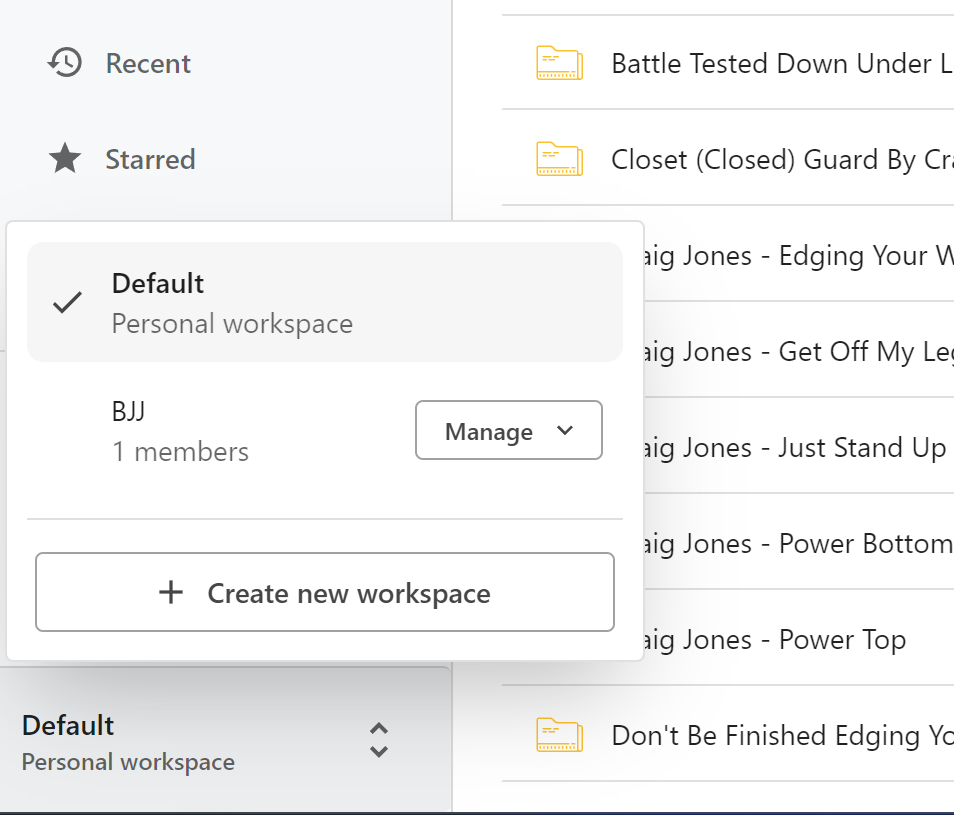
I knew there were workspaces, so I made sure I uploaded all the files intending to transfer them to a shared workspace. Unfortunately, that’s not possible. You get an empty workspace with no way to transfer your existing files between workspaces. This means I would have to upload everything all over again.
Since my whole drive has one purpose - storing my BJJ instructionals - I decided to share my entire drive by creating a new folder and sharing access to it. But this brings us back to our previous point: you can’t select everything at once, so you’ll have to essentially drag and drop every 👏 single 👏 folder 👏.
Sharing is easy: right click a folder or file and click “Share” or “Get Link”, it opens the same window. I’ve tried sharing it with a friend, but it seems that you can only share files between Folderfort users
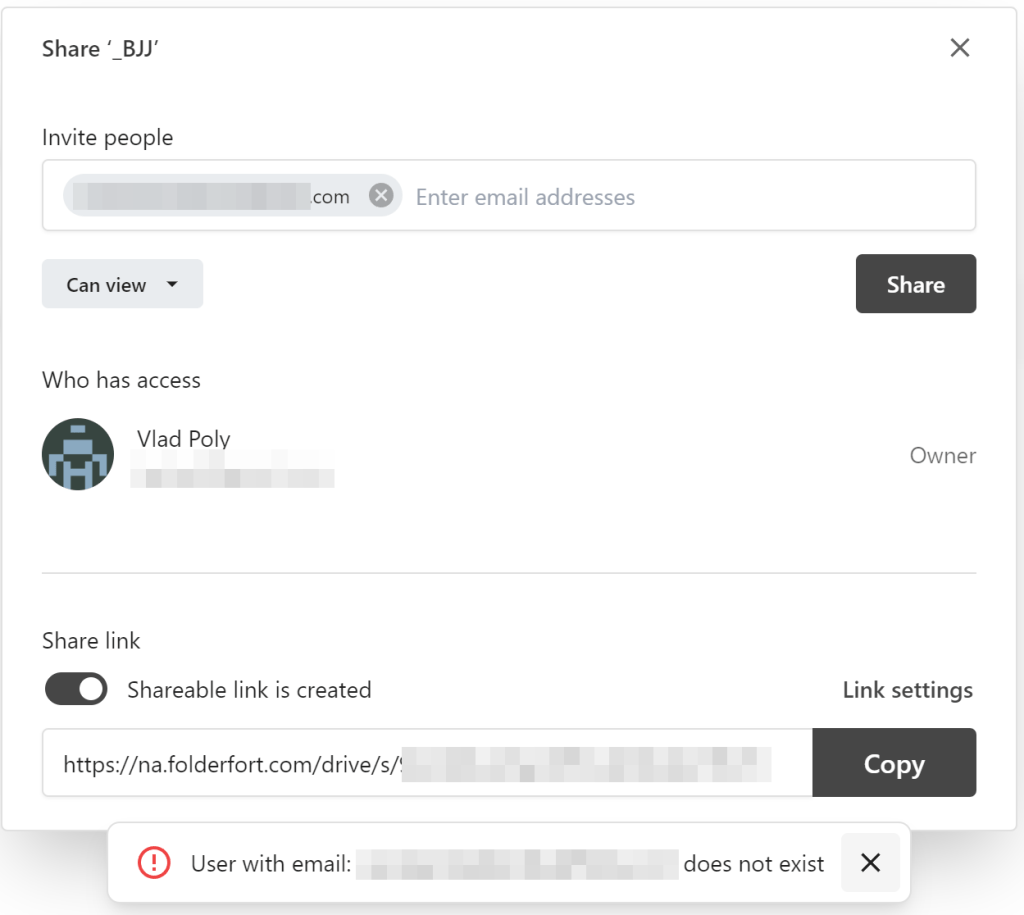
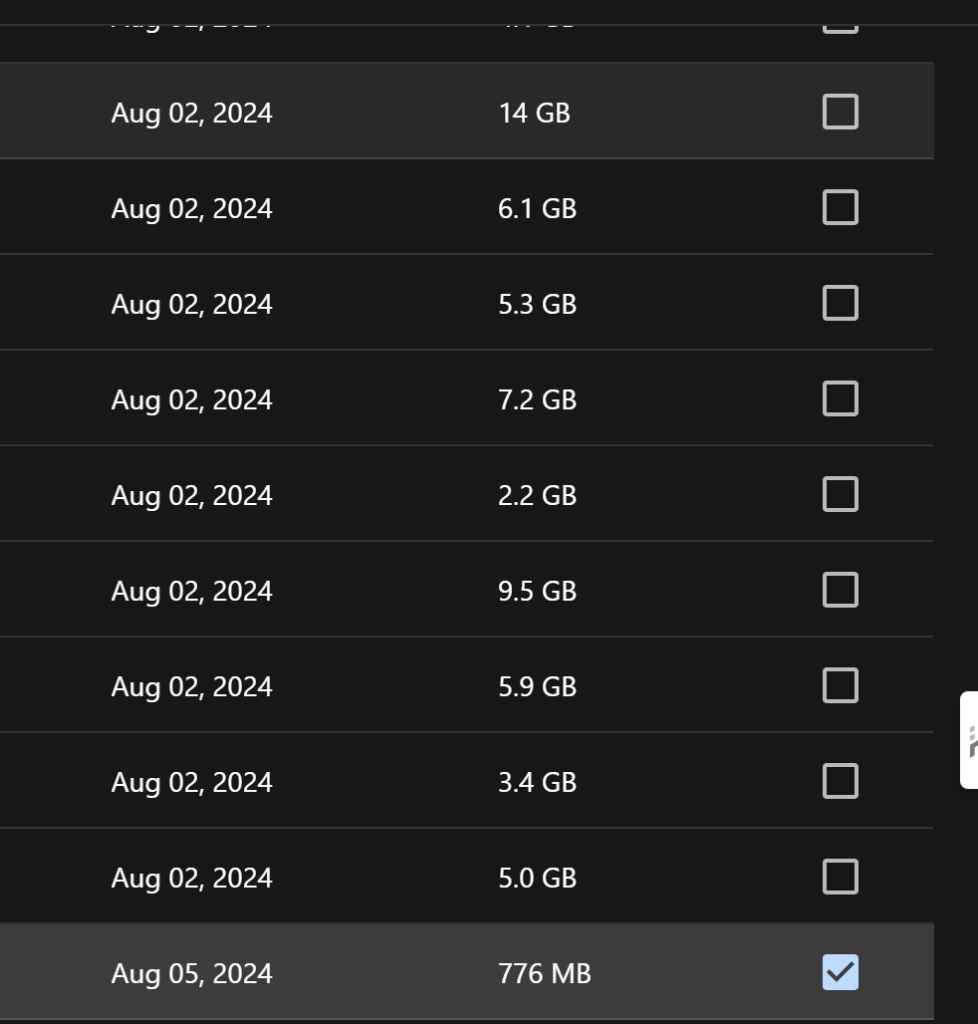
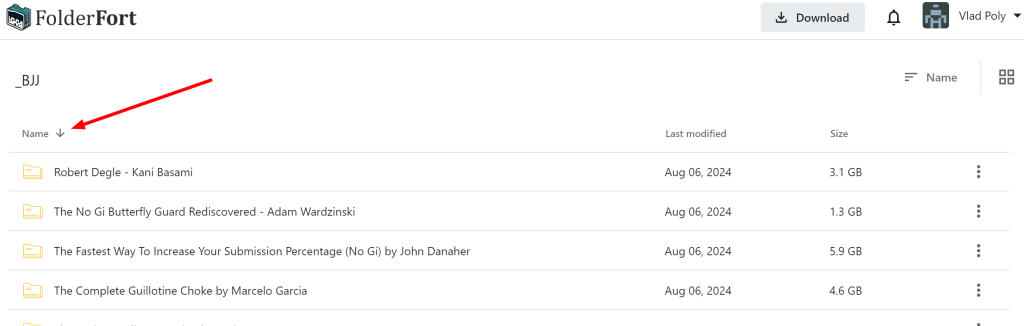
I’ve used the shareable link instead and sent that. One small problem is that you can’t sort the files the way you like, it just won’t work:
Support and Community
Their support team is active on Reddit, as seen in this thread . I did bring up my issues with them in a private message, and while they replied, they offered no solution and subsequently ignored me.
I didn’t reach out to their support team otherwise, so I can’t say anything good or bad. It’s already a good sign that they take their social media alerts seriously. If anyone mentions FolderFort, they come running!
Company Research
After looking at their About Us page, I searched for their owner but couldn’t find a trace of him anywhere. He’s a ghost. No picture, no LinkedIn, no nothing. Their LinkedIn profile has no employees, which is a red flag.
Some interesting tidbits:
- According to a post published in April , they’ve launched in April 2024 and the owner is “Dave Buell”
- Their GTM/HotJar tag shows the first time they’ve been used was April 2024
- According to Ahrefs , they’ve had their first page crawled on March 1st and their first keyword on July 8th
- According to Whois data , their domain was registered with GoDaddy on February 20, 2024
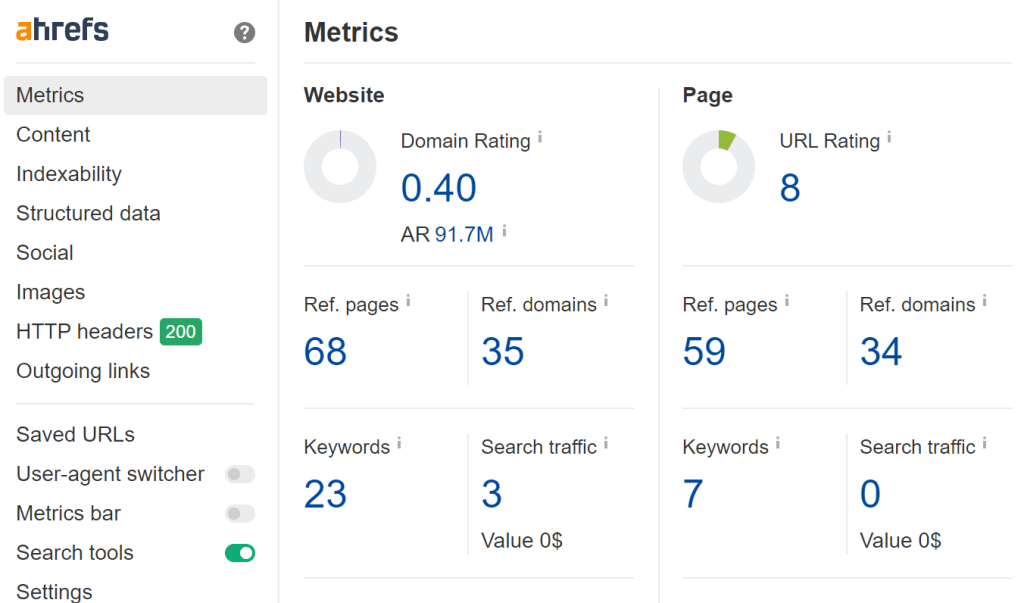
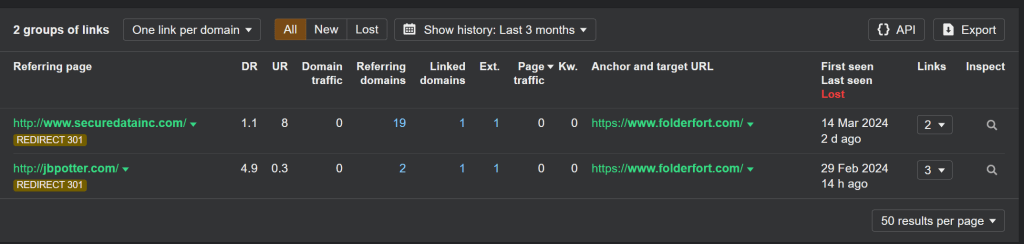
Two domains are being redirected to folderfort.com: jbpotter.com and securedatainc.com . I didn’t bother looking into them, but I think these are two domains that were bought and redirected because they seem random and unrelated. If there’s an SEO specialist behind this, fire him (or hire me, hehe), because this is not done well.
25/06 Update: Folder Fort Business and Lifetime Accounts
On 25/06, Folder Fort sent an account update saying future development is moving toward Folder Fort Business. The short version: they are phasing out new lifetime accounts, stopping additional lifetime storage from being added to existing lifetime accounts, and putting future work into business features, advanced storage, privacy, customization, and what they describe as post-quantum-ready infrastructure.
As someone who paid for a FolderFort lifetime cloud storage account, my first reaction was basically: wait, what happens to the thing I already bought?
To their credit, they later clarified the message. Existing lifetime accounts are not being shut off, downgraded, removed, or changed. If you already have a lifetime account, it continues as-is. Migration to Folder Fort Business is optional.
Their clarification also said lifetime users who want to move to Folder Fort Business can carry over eligible lifetime storage without repurchasing that storage. The catch is that you would still need the base Folder Fort Business subscription if you want the new Business system and features.
So, no, this does not sound like existing FolderFort lifetime accounts are disappearing. But the first email was confusing, and I think it’s fair for lifetime users to be nervous when a service starts changing the business model around long-term storage.
Conclusion
When I first wrote this review, FolderFort was a very new player in the cloud storage market. It still feels like a young service in some ways, with growing pains and rough edges, but it has also kept shipping updates since launch.
The Good:
- If you managed to snatch the temporary 1TB for $69.99 lifetime deal, you got a boatload of storage space for very little money.
- The interface looks neat and clean
- The registration process is straightforward
- Their support is active on Reddit every day
- The Android and iOS apps now exist, which makes FolderFort much more practical than it was at launch
The Bad:
- The mobile app still feels rough around the edges
- The interface, while simple, is not always intuitive
- Some features are confusing, like the disappearing upload bar and the server selection during login
- No ability to pause uploads or mass-delete folders
- Sharing files is not as straightforward as it seems
- The lifetime-to-Business messaging was confusing enough that I had to ask them directly what happens to existing lifetime accounts
Despite these issues, FolderFort shows great potential. As they work through their initial challenges and add more features, it could become an excellent alternative to more established cloud storage services. However, potential users should be aware of its current limitations and approach with realistic expectations.
I have concerns about the fact that their owner is nowhere to be found; it says on their About page that Dave Buell is the owner, but there’s no digital trace of that person (smells like a russian spy to me /s).
Overall, if you’re willing to be patient with a developing service and can benefit from the generous storage offer, FolderFort could be a great deal. My referral link should give you 25% off if you sign up, but please treat this as a real FolderFort cloud storage review, not a blind recommendation. I bought it, I use it, and I still think you should be prepared for some bumps along the way as they continue to refine and improve their product.
My rating: 4 out of 5. Excellent value and a clean interface, marked down for the rough app/UX, the clunky bulk-delete and upload handling, the confusing lifetime-to-Business messaging, and the lack of transparency about who actually runs it.
FAQ
Is FolderFort Legit?
Yes, based on my experience, FolderFort is a real service and my account/storage worked after I bought the lifetime deal. That does not mean everything is polished. It is still a young product with rough edges.
Is FolderFort Reliable?
For my personal use, I haven’t had account access problems since I bought it in August 2024. I would still avoid treating FolderFort as my only copy of important files.
Is FolderFort a Scam?
No, I don’t think FolderFort is a scam. I paid for the FolderFort lifetime plan, my account works, my storage is active, and I’ve been using it. That said, it’s still a young service with rough edges, confusing messaging at times, and less polish than bigger cloud storage companies.
Is FolderFort a Google Drive Replacement?
Not really. FolderFort can replace Google Drive only if your main need is basic file storage. If you use Google Drive for document editing, collaboration, mobile workflows, syncing, search and integrations, FolderFort is not on the same level.
Is FolderFort Good for Backups?
It can be useful as an extra backup location, but I would not use it as my only backup. For important files, I would still keep a local copy and another cloud copy somewhere else.
Is FolderFort Private?
FolderFort says it uses Backblaze infrastructure, SSL for transfers, AES-256 server-side encryption for files at rest, and optional 2FA. That is fine for basic storage, but it is not the same as client-side encryption or zero-knowledge storage. If privacy matters, encrypt sensitive files yourself before uploading.
Is FolderFort Safe?
I can’t independently audit FolderFort’s infrastructure, so I wouldn’t make a hard security claim. They market the service around privacy and have talked about stronger encryption and post-quantum-ready infrastructure for Folder Fort Business, but readers should treat that as company messaging unless it is independently verified.
Does FolderFort Have an App?
Yes. FolderFort now has an Android app and an iOS app. This is different from the product I first bought and tested, which felt much more browser-based. I would still judge the apps as developing features rather than assuming they are as polished as Google Drive, Dropbox or OneDrive.
Does FolderFort Have Mobile Apps?
Yes, FolderFort now officially lists Android and iOS apps. I have used the Android app: it is not super user friendly yet, but it generally does the job. I have not personally tested the iOS app.
Does FolderFort Have an Android App?
Yes, the FolderFort Android app is available on Google Play.
What Happens to FolderFort Lifetime Accounts?
Based on the clarification email I received from Folder Fort, existing lifetime accounts are not being removed, downgraded, or shut off. They said those accounts continue as-is. Moving to Folder Fort Business is optional, and eligible lifetime storage can be carried over without repurchasing that storage, although you would still need the base Business subscription if you want the Business system.
Does FolderFort Support WebDAV, SFTP or Rclone?
FolderFort now documents FF Connect with SFTP, WebDAV and rclone access. That makes it more useful for technical users, but the documentation also recommends conservative transfer settings and low concurrency. So I would call this a useful power-user feature, not a magic replacement for a mature sync ecosystem.
What Is the API Credits Issue?
FolderFort says API credits are used for uploads and downloads through third-party tools and the Folder Fort Sync App. Their explanation says 1GB equals 1 credit. This means buyers should not only look at storage size, but also understand whether their use case will require API credits.
Is the FolderFort Lifetime Deal Worth It?
It can be worth it if you want cheap secondary cloud storage and understand the tradeoffs. The lifetime deal is the main reason FolderFort is interesting. I would not buy it expecting a perfect Google Drive or Dropbox replacement.
What Is the Biggest Problem With FolderFort?
For me, the biggest problem was not raw upload speed. It was polish: failed uploads without clear explanations, confusing server/login behavior, limited bulk actions, and sharing/workspace friction.